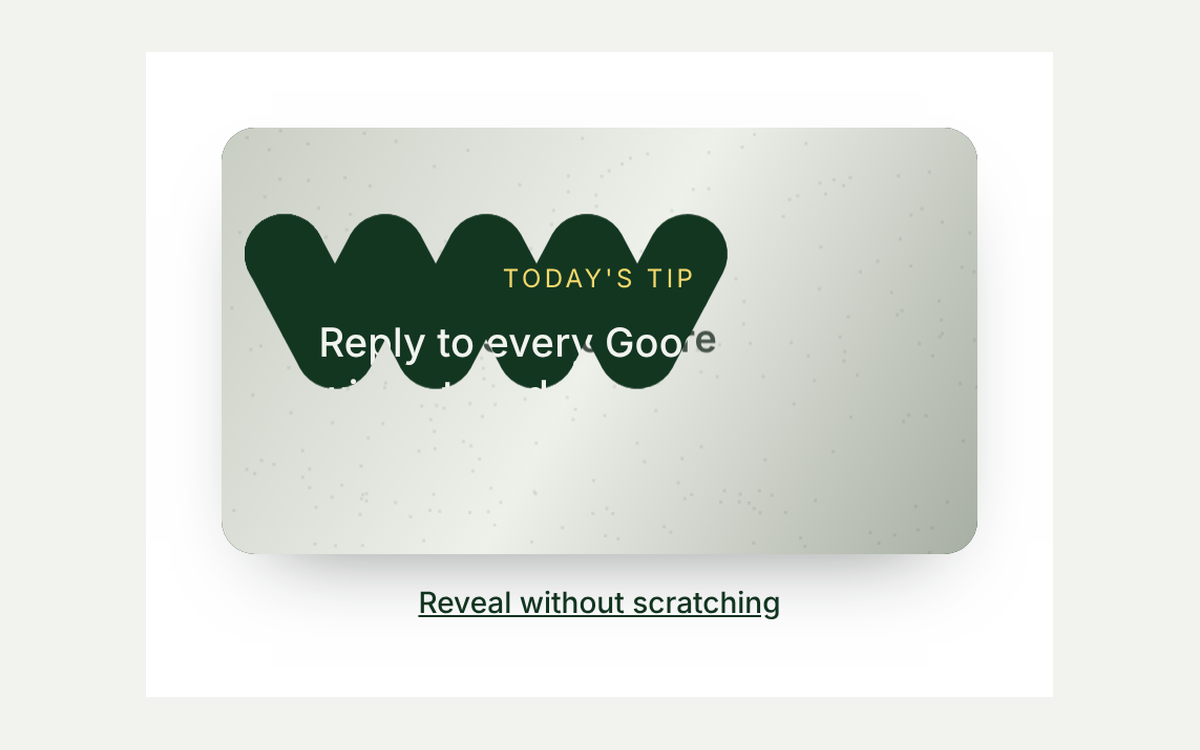
A florist puts "free delivery this week" in a banner, and nobody notices, because banners all look the same. Now picture the same words sliced into strips that drift apart, so the headline looks like a smudge until you move across the card and find the one spot where it snaps into focus. That is the old painter's trick called anamorphosis: an image that only reads from the right angle. Here it guards a small offer, and finding the angle reveals the code.
This week's offer is hidden in plain sight. Move across the card until the words line up.
Florist offer
Free delivery on every bouquet
on every bouquet this week
Mouse: move over the card. Touch: drag on it. Keyboard: focus it and use the arrow keys.
Your code: BLOOMFREE. Enter it at checkout.
How it works
- Cut the headline into bands. The script makes six copies of the headline and uses
clip-pathso each copy shows only one horizontal band. Stacked together, they look like the normal words. - Give each band its own lean. Every band has a multiplier, some positive and some negative. The further your pointer is from a hidden sweet spot, the further each band slides and skews in its own direction. At the sweet spot every offset becomes zero, so the words line up.
- Ease, then rest. The drawn position glides towards the pointer each animation frame, which makes the motion feel like looking around a corner. When nothing is moving, the loop stops, so an idle card costs nothing.
- Lock it in. Stay within a small distance of the sweet spot for about a third of a second and the card locks, gets a gold outline, and the code appears. A live region tells screen reader users the same thing.
- A new spot each round. "Hide it again" scrambles the bands and picks a fresh sweet spot, so a second go is still a little search.
The code
Three self contained blocks: the card markup, its scoped styles, and a small script with no libraries.
<div class="an" data-lab="anamorphic-offer">
  <p class="an-intro">This week's offer is hidden in plain sight. Move across the card until the words line up.</p>
  <div class="an-card" tabindex="0" aria-describedby="an-help">
    <p class="an-kicker">Florist offer</p>
    <p class="an-sr">Free delivery on every bouquet</p>
    <!-- The script fills this with slices of the headline that drift apart. -->
    <div class="an-word" aria-hidden="true" data-text="Free delivery"></div>
    <p class="an-small">on every bouquet this week</p>
    <span class="an-eye" aria-hidden="true"></span>
  </div>
  <p id="an-help" class="an-help">Mouse: move over the card. Touch: drag on it. Keyboard: focus it and use the arrow keys.</p>
  <p class="an-status" aria-live="polite"></p>
  <div class="an-prize" hidden>
    <p>Your code: <span class="an-code">BLOOMFREE</span>. Enter it at checkout.</p>
  </div>
  <div class="an-actions">
    <button type="button" class="an-skip">Just show me</button>
    <button type="button" class="an-again" hidden>Hide it again</button>
  </div>
</div>.an {
width: min(100%, 440px);
display: grid;
justify-items: center;
gap: 12px;
font-family: system-ui, sans-serif;
color: #101a14;
text-align: center;
}
.an p { margin: 0; }
.an-intro, .an-help { font-size: 14px; line-height: 1.45; color: #46534a; }
.an-card {
position: relative;
width: 100%;
aspect-ratio: 8 / 5;
display: grid;
align-content: center;
gap: 6px;
padding: 18px;
box-sizing: border-box;
border-radius: 18px;
background: #133621;
color: #f2f3ef;
overflow: hidden;
container-type: inline-size;
cursor: crosshair;
touch-action: none;
user-select: none;
-webkit-user-select: none;
transition: box-shadow .4s;
}
.an-card:focus-visible { outline: 3px solid #f4d96c; outline-offset: 3px; }
.an-card.is-aligned { box-shadow: 0 0 0 3px #f4d96c, 0 14px 40px rgba(19, 54, 33, .35); }
.an-kicker { font-size: 12px; letter-spacing: .14em; text-transform: uppercase; color: #f4d96c; }
.an-small { font-size: 15px; color: #c9cec4; }
/* Visually hidden, so screen readers get the offer straight away. */
.an-sr { position: absolute; width: 1px; height: 1px; overflow: hidden; clip: rect(0 0 0 0); white-space: nowrap; }
/* Every slice holds the same words; clip-path shows one horizontal band of each. */
.an-word { position: relative; height: 1.25em; font: 800 clamp(30px, 12cqw, 56px)/1.25 system-ui, sans-serif; color: #f4d96c; }
.an-slice { position: absolute; inset: 0; white-space: nowrap; will-change: transform; }
.an-eye {
position: absolute;
width: 14px;
height: 14px;
margin: -7px 0 0 -7px;
border: 2px solid #f4d96c;
border-radius: 50%;
pointer-events: none;
opacity: .7;
}
.an-card.is-aligned .an-eye { opacity: 0; }
.an-status { min-height: 1.4em; font-size: 15px; font-weight: 600; color: #133621; }
.an-prize p { padding: 10px 16px; border: 1px dashed #133621; border-radius: 10px; background: #fbf3cf; font-size: 15px; }
.an-code { font: 700 16px/1 ui-monospace, monospace; letter-spacing: .06em; }
.an-actions { display: flex; gap: 10px; }
.an-actions button {
padding: 10px 16px;
border: 1px solid #c9cec4;
border-radius: 999px;
background: #fff;
color: #133621;
font: 600 14px/1 system-ui, sans-serif;
cursor: pointer;
}
.an-actions button:focus-visible { outline: 3px solid #f4d96c; outline-offset: 2px; }
@media (prefers-reduced-motion: reduce) {
.an-card { transition: none; }
}(function () {
var root = document.querySelector('[data-lab="anamorphic-offer"]');
if (!root) return;
var card = root.querySelector('.an-card');
var word = root.querySelector('.an-word');
var eye = root.querySelector('.an-eye');
var status = root.querySelector('.an-status');
var prize = root.querySelector('.an-prize');
var skip = root.querySelector('.an-skip');
var again = root.querySelector('.an-again');
var calm = window.matchMedia('(prefers-reduced-motion: reduce)').matches;
var SLICES = 6; // horizontal bands the headline is cut into
var SPREAD = 110; // how far (px) the bands drift when you are far off
var NEAR = 0.07; // how close to the sweet spot counts as lined up
var HOLD = 350; // ms to stay there before it locks
// Each band moves by its own amount and direction, so they only meet at one spot.
var KX = [1, -0.7, 0.45, -1, 0.8, -0.4], KY = [-0.5, 0.9, -0.3, 0.6, -0.8, 0.4];
var view = { x: 0.15, y: 0.2 }, shown = { x: 0.15, y: 0.2 }, target = { x: 0.7, y: 0.6 };
var raf = 0, nearSince = 0, locked = false, slices = [];
for (var i = 0; i < SLICES; i++) {
var s = document.createElement('span');
s.className = 'an-slice';
s.textContent = word.getAttribute('data-text');
s.style.clipPath = 'inset(' + (i * 100 / SLICES) + '% 0 ' + ((SLICES - i - 1) * 100 / SLICES) + '% 0)';
word.appendChild(s);
slices.push(s);
}
function draw() {
var dx = shown.x - target.x, dy = shown.y - target.y;
for (var i = 0; i < SLICES; i++) {
slices[i].style.transform = locked ? '' :
'translate(' + (KX[i] * dx * SPREAD).toFixed(1) + 'px,' + (KY[i] * dy * SPREAD * 0.5).toFixed(1) + 'px) skewX(' + (KX[i] * dx * 25).toFixed(1) + 'deg)';
}
eye.style.left = view.x * 100 + '%';
eye.style.top = view.y * 100 + '%';
}
// Ease what is drawn towards the viewpoint; stop the loop once it settles.
function frame(t) {
raf = 0;
shown.x += (view.x - shown.x) * 0.2;
shown.y += (view.y - shown.y) * 0.2;
draw();
var near = Math.abs(view.x - target.x) < NEAR && Math.abs(view.y - target.y) < NEAR;
if (!near) nearSince = 0;
else if (!nearSince) nearSince = t;
else if (t - nearSince > HOLD) return unlock('Lined up. The code is below.');
if (near || Math.abs(view.x - shown.x) + Math.abs(view.y - shown.y) > 0.002) raf = requestAnimationFrame(frame);
}
function look(x, y) {
if (locked) return;
view.x = Math.max(0, Math.min(1, x));
view.y = Math.max(0, Math.min(1, y));
if (!raf) raf = requestAnimationFrame(frame);
}
function unlock(msg) {
locked = true;
if (raf) cancelAnimationFrame(raf);
raf = 0;
draw();
card.classList.add('is-aligned');
prize.hidden = false;
skip.hidden = true;
again.hidden = calm;
status.textContent = msg;
}
function scramble() {
locked = false;
card.classList.remove('is-aligned');
prize.hidden = true;
skip.hidden = false;
again.hidden = true;
status.textContent = '';
// A new sweet spot each round, away from the edges.
target.x = 0.25 + Math.random() * 0.5;
target.y = 0.3 + Math.random() * 0.4;
view.x = shown.x = target.x > 0.5 ? 0.1 : 0.9;
view.y = shown.y = 0.2;
draw();
}
function fromPointer(e) {
var r = card.getBoundingClientRect();
look((e.clientX - r.left) / r.width, (e.clientY - r.top) / r.height);
}
card.addEventListener('pointermove', function (e) {
if (e.pointerType === 'mouse' || e.buttons) fromPointer(e);
});
card.addEventListener('pointerdown', function (e) { fromPointer(e); });
card.addEventListener('keydown', function (e) {
var step = 0.04, k = { ArrowLeft: [-step, 0], ArrowRight: [step, 0], ArrowUp: [0, -step], ArrowDown: [0, step] }[e.key];
if (!k) return;
e.preventDefault();
look(view.x + k[0], view.y + k[1]);
});
skip.addEventListener('click', function () { unlock('Here it is. No lining up needed.'); again.focus(); });
again.addEventListener('click', scramble);
// Reduced motion: no drifting slices, the offer is simply shown.
if (calm) unlock('');
else scramble();
})();When to use it, and when not to
This is a curiosity hook, so give it a job where a bit of play is welcome: a weekly offer on a florist, bakery or gift shop site, a launch teaser for a new menu, a hidden thank you code at the end of a newsletter landing page, or a playful section on an event page. The gentle search makes people actually read the words they uncover, which a static banner rarely achieves.
Keep it away from anything people need quickly or must understand to act safely: prices, opening hours, delivery cut offs, booking buttons, legal text. A scrambled headline in those places is just a broken page. It also asks for a pointer or a finger in motion, which is harder for some people, so this demo always offers "Just show me", puts the full offer in visually hidden text for screen readers, and supports the arrow keys. With reduced motion turned on in the operating system, the card skips the effect and shows the offer and code straight away. One more trade off: on phones the card blocks page scrolling while a finger is on it, so keep it compact and not full screen.
Make it yours
- The words: change
data-texton.an-wordfor the scrambled headline, and keep the hidden.an-srline and the code in.an-codein step with it. - Difficulty:
SPREADsets how wild the bands get,NEARhow close counts as lined up, andHOLDhow long to stay there. A largerNEARmakes it easier. - The look of the scramble:
SLICESsets the number of bands, and theKXandKYlists set how far and which way each band leans. Keep one value per band.
Frequently asked questions
Can people find the code without playing?
Yes, and that is on purpose. The "Just show me" button and the visually hidden text make it a bit of fun, not a gate, so treat the code as a friendly bonus rather than a secret.
Does it work on phones and tablets?
Yes. It uses pointer events, so dragging a finger across the card works like moving a mouse, and the small ring shows where your viewpoint is.
Will it slow my page down?
No. It moves a handful of text elements with CSS transforms, uses no images or libraries, and its animation loop only runs while the pointer is moving or close to the sweet spot.